⚡ PrestaShop 8 & 9 Module

PrestaShop Top Banner Module — Targeted Announcement Bars That Increase Sales

Show free shipping announcements, Black Friday promotions, flash sales and customer-specific offers using advanced targeting rules. Display the right message to the right visitor at the right time — with zero coding.

One-time payment  ·  $34  ·  Free future updates
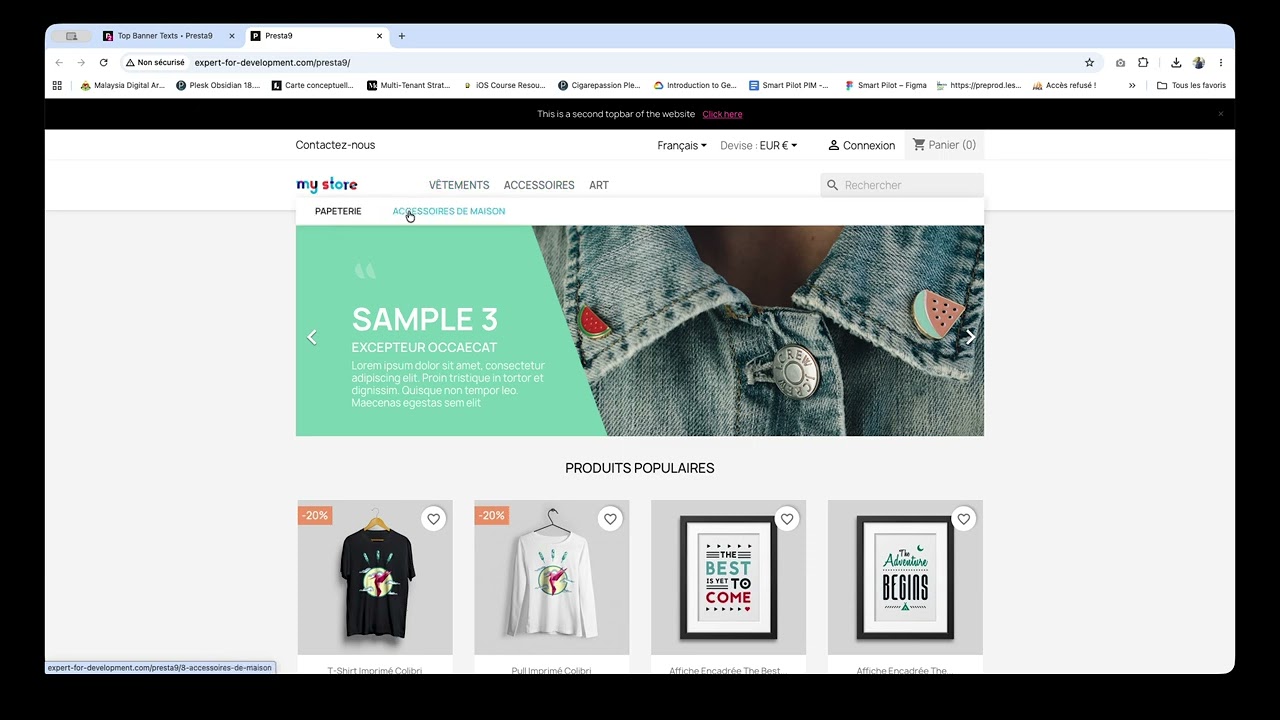
▶ Watch Full Demo (2 Minutes)
Unlimited banners
0
External dependencies
180+
Countries supported
PS 8
Fully compatible
$34
One-time price
Real Business Use Cases

More Than Just A Banner

Use the module to increase conversions, promote offers and communicate with your customers effectively.

Free Shipping Campaigns
Display a "Free shipping on orders over $50" bar across your entire store or only on the cart page — exactly where it converts best.
Black Friday Promotions
Schedule your Black Friday or Cyber Monday banners weeks in advance. They go live and expire automatically — no midnight logins needed.
Country-Specific Offers
Show "Free delivery in France 🇫🇷" to French visitors and a different offer to German visitors — all from the same module, same store.
VIP Customer Promotions
Target wholesale customers or loyalty members with exclusive offers that regular visitors never see. Perfect for B2B stores.
Flash Sales & Countdowns
Announce limited-time flash sales with urgent messaging. Use scheduling to start and stop the banner automatically at exact times.
Store Announcements
Communicate holiday closures, shipping delays, or new product launches with a targeted banner — without touching your theme files.
What you get

Every tool to own your store's top bar

Built for PrestaShop merchants who want full control — no template restrictions, no monthly fees.

Full Design Control
Customize background, text and button colors, banner height, scroll speed, and text direction (LTR/RTL) from a clean back-office UI.
Smart Targeting
Show the right banner to the right visitors. Target by page (home, category, product, cart, checkout), customer group, and country via IP geolocation.
Date Scheduling
Set start and end dates for every banner. Plan your Black Friday, summer sale, or flash promotion banners weeks in advance.
Call-to-Action Button
Add an optional CTA button to any banner with custom text, URL, and target. Drive clicks to your sale pages directly from the announcement bar.
Lightweight & Fast
Pure CSS animation with vanilla JS and zero external dependencies. No performance hit, no jQuery, no bloat. Your store stays fast.
Multi-Store & Multi-Language
Native support for PrestaShop's multi-store and multi-language architecture. Manage banners across all your shops from one place.
Fully Responsive
Looks great on every device — from wide desktop monitors to mobile screens. Adjustable banner height ensures a perfect fit everywhere.
Secure by Design
Built with CSRF protection, data validation, and prepared SQL queries. Your store's security is never compromised.
Unlimited Banners
Create as many banners as you need. Control display order and position. No arbitrary limits — your store, your rules.
Installation

Live in 3 minutes

No developer needed. Upload, configure, publish.

1
Download & Upload
Get the .zip file and upload it via PrestaShop's Module Manager in your back-office.
2
Create Your Banner
Open the module, click "New Banner", and fill in your message, colors, and CTA button.
3
Set Targeting Rules
Pick which pages, customer groups, and countries should see this banner, then schedule the dates.
4
Save & Go Live
Hit save. Your banner appears at the top of your storefront instantly — no cache clearing needed.
Comparison

Why choose Advanced Top Banner Manager?

See how it stacks up against basic PrestaShop banner solutions.

Feature Advanced Top Banner Manager Basic / Free alternatives
Unlimited banners ✗ Usually 1 banner
Scrolling text animation
Country targeting (IP geolocation)
Customer group targeting
Page-level targeting
Date scheduling
Call-to-action button
Full color customization Limited
LTR / RTL text direction
Multi-store & multi-language Partial
Zero external dependencies Often jQuery-heavy
How It Works

Backend control, frontend impact

A complete walkthrough — from the PrestaShop back office where you build banners, to exactly what your visitors see on the storefront.

In the Back Office
Advanced Top Banner Manager in the PrestaShop Module Manager
1

Install in seconds

Upload the zip, then find Advanced Top Banner Manager under Modules → Module Manager and hit Configure. No theme edits, no FTP, no developer required.

PrestaShop 8 & 9One-click installNo template changes
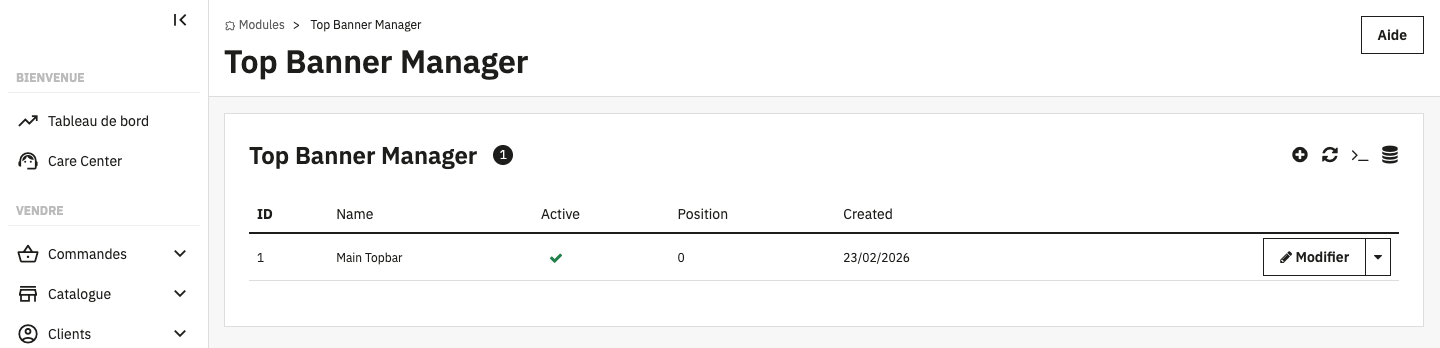
Banner list with status, position and creation date
2

Manage all your banners in one list

The dashboard shows every banner with its active status, display position and creation date. Create, edit, enable/disable or delete — full CRUD. Each row is one banner container.

Unlimited bannersEnable / disableOrdered display
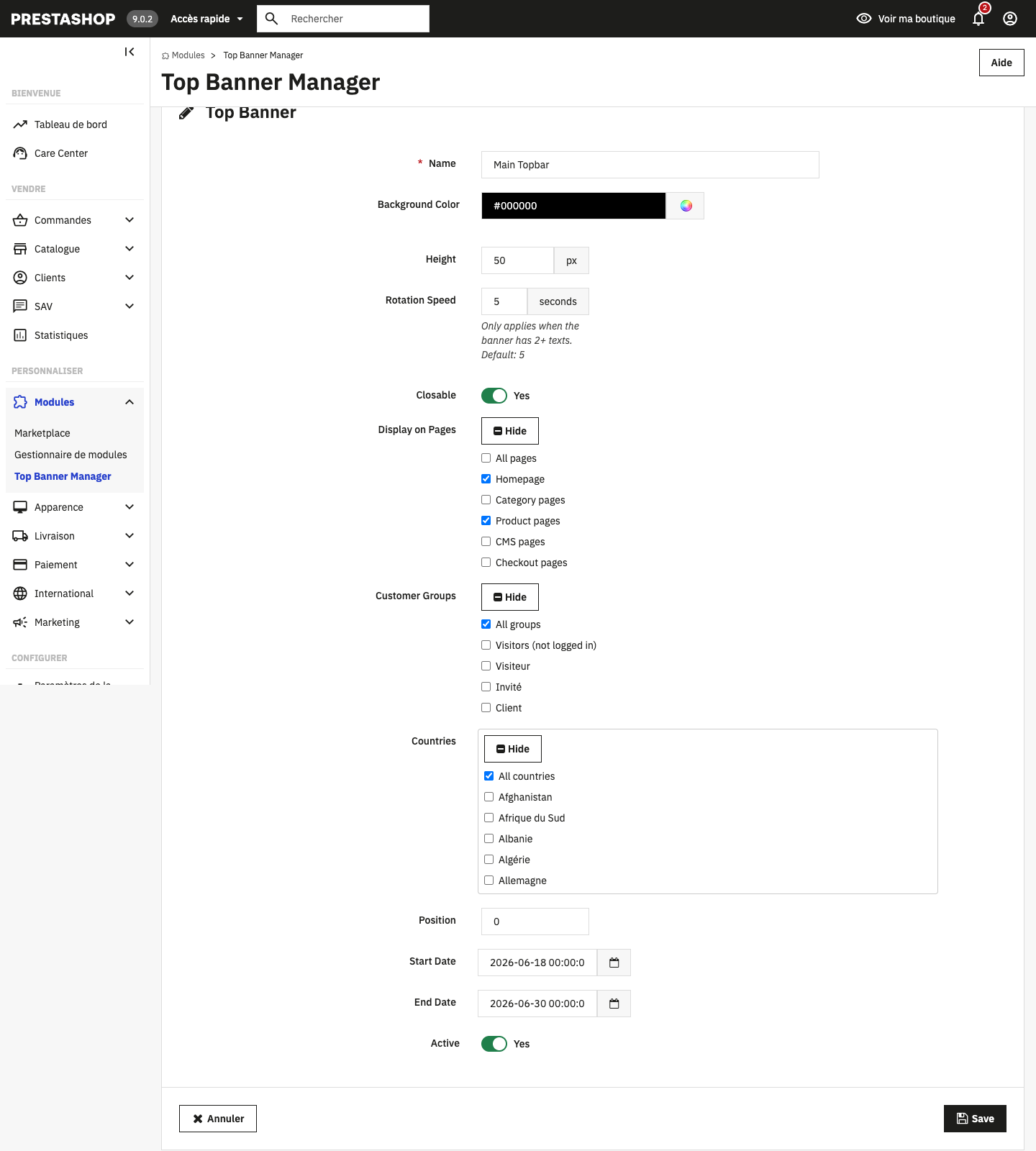
Banner configuration form with appearance and display rules
3

Configure appearance & targeting

Set the background colour, height and rotation speed, then decide exactly who sees it: target pages (home, category, product, CMS, checkout), customer groups, and countries. Add a start/end date to schedule campaigns and let visitors dismiss it with Closable.

Page targetingCustomer groupsGeo / country rulesDate scheduling
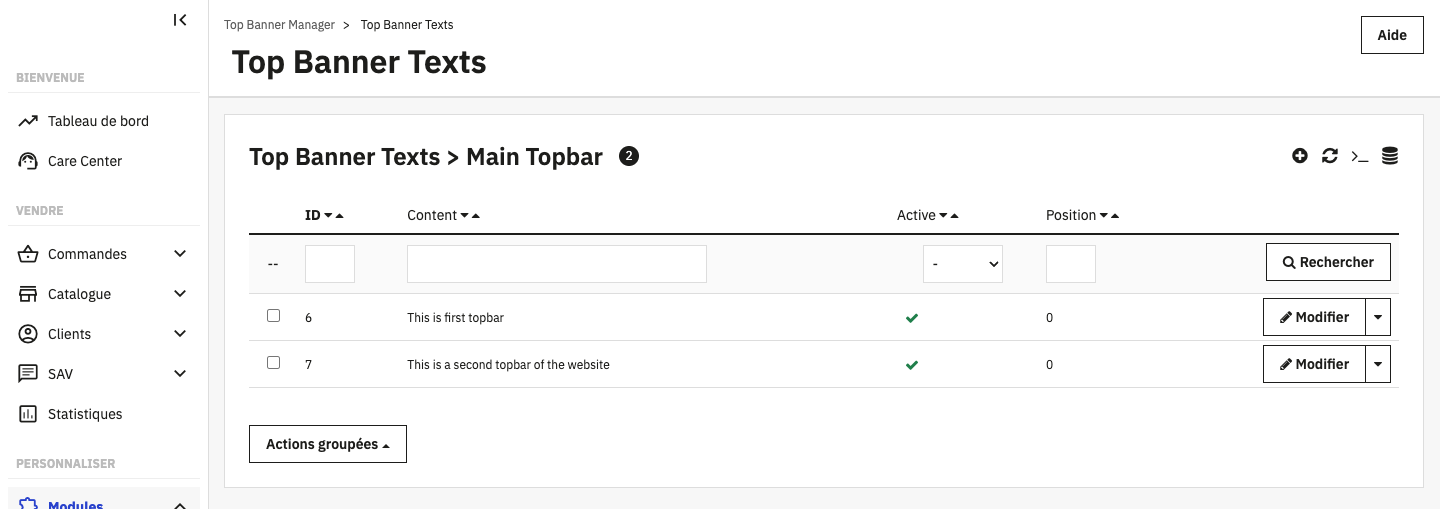
Multiple rotating text messages inside one banner
4

Add rotating messages

Each banner is a container that holds multiple text items which rotate automatically. Stack as many as you like — "Free shipping over $50", "Black Friday −30%", "New collection live" — and they cycle at the speed you set.

Unlimited messagesAuto-rotationReorderable
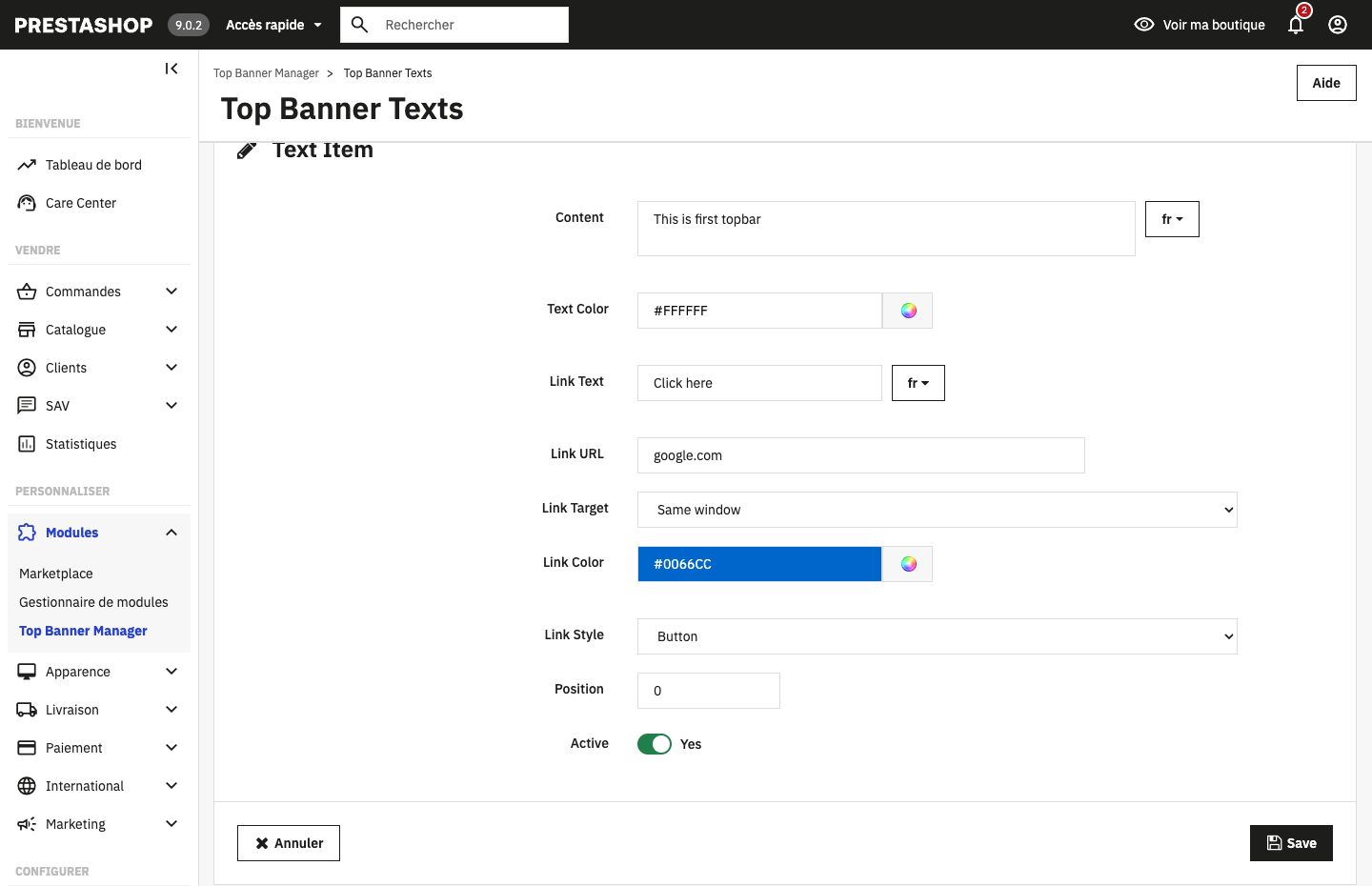
Per-message styling: text colour, link, button and multilingual content
5

Style every message individually

Each message gets its own text colour, an optional link or button (text, URL, target), link colour and a Link Style switch — render it as a solid button or a simple text link. Content and link text are fully multilingual.

Button or text linkCustom coloursMulti-language
On Your Storefront
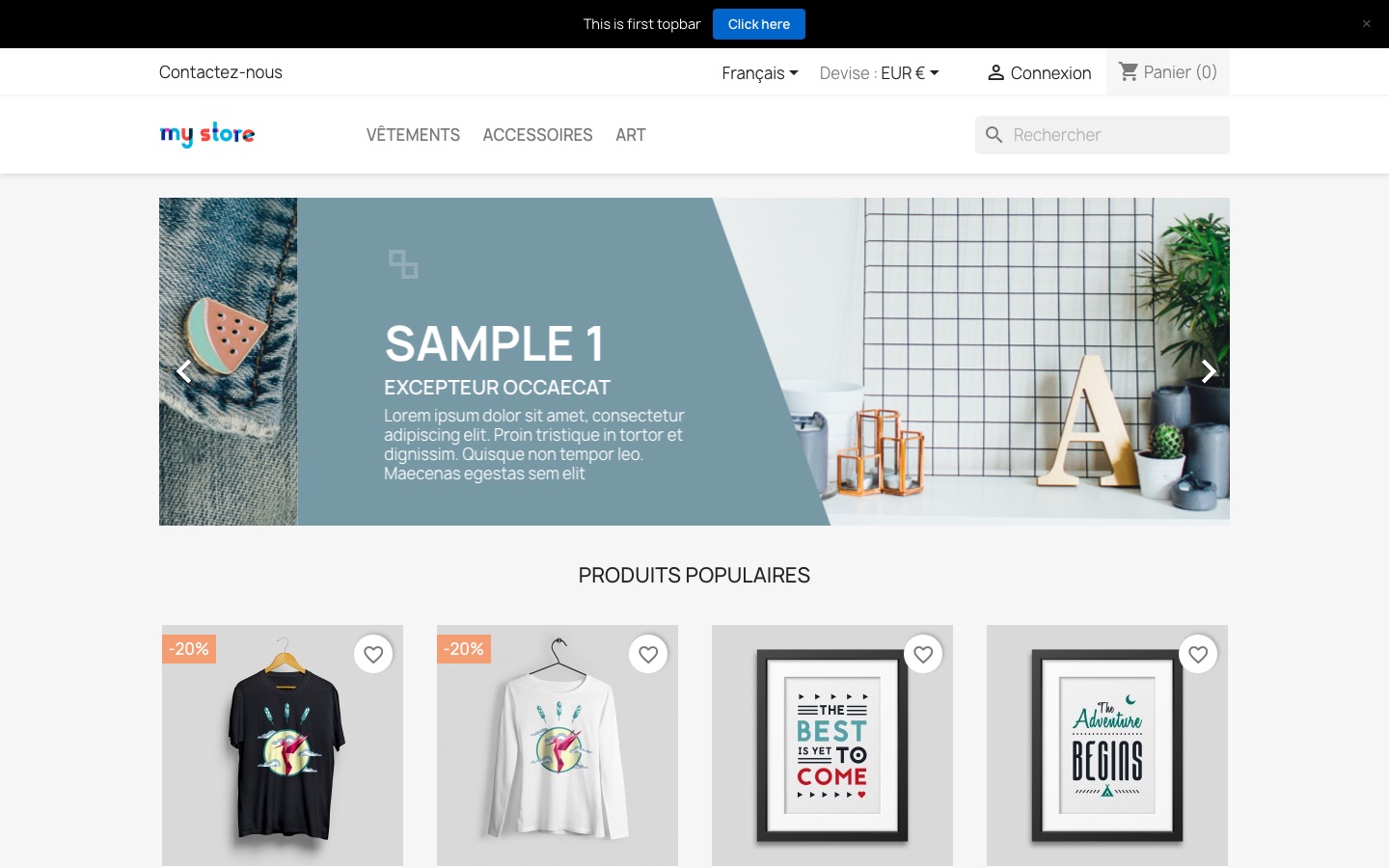
Banner pinned to the very top of the storefront, above the header
Pinned above the header — the first thing every visitor sees.
6

Live at the very top of your store

The banner renders through PrestaShop's displayBanner hook — pinned above the header on every targeted page. Pure CSS animation with pause-on-hover and zero external dependencies, so it never slows your store down.

Above the foldPause on hoverLightweight
Close-up of the banner with a call-to-action button and close control
Message 1 — call-to-action button + dismiss control.
7

Clear call-to-action, dismissible

Visitors get a crisp message and a clickable button driving them to any URL you choose. If you enabled Closable, a discreet × lets them dismiss the bar.

Custom CTAAny target URLOptional close (×)
Responsive banner on mobile showing the second rotating message as a text link
Message 2 rotating in on mobile — styled as a text link.
8

Looks great on every screen

Fully responsive — the bar, rotating text and links adapt to any viewport. Here the second message has rotated in, styled as a coloured text link instead of a button, proving each message keeps its own look on mobile too.

ResponsiveMobile-readyPer-message styling

⚙️ How it renders, under the hood

Display rules are resolved server-side, so only the right visitors ever receive a banner — there is no flash of irrelevant content and nothing leaks to users who shouldn't see it.

Screenshots

See it in action

Clean back-office, powerful configuration, stunning front-end output. Click any image to enlarge.

Requirements

What you need

Lightweight requirements, maximum compatibility.

PrestaShop 8.0 – 9.x
PHP 8.1 or higher
MySQL 5.6+ / MariaDB
No extra libraries needed
Why Store Owners Love It

Why Store Owners Love This Module

Setup In Minutes
No coding, no theme editing, no developer required. Upload the module, create your first banner, and you're live in under 5 minutes.
Increase Promotion Visibility
The top of the page is the highest-visibility real estate in your store. Put your best offer there and make sure every visitor sees it.
Advanced Targeting
Stop showing irrelevant banners to everyone. Show the right message only to the customers who matter — and watch your click-through rates rise.
One-Time Cost, Lifetime Value
Pay $34 once and use it forever. No monthly SaaS fees, no per-store charges, no renewal surprises. Free updates included.
Pricing

Simple, one-time pricing

Pay once. Use forever. Free updates included.

Regular License
$34
One-time payment · No subscription
Unlimited banners
All features included
Free future updates
Quality checked by Codester
.php, .css, .js source files
Free support from author
Buy Now on Codester →
🔒 Lowest price guarantee by Codester  ·  Secure checkout
Guide

How To Add An Announcement Bar In PrestaShop 8

Announcement bars — also called notification bars, top banners, or promo bars — are one of the most effective conversion tools in e-commerce. Placed at the very top of every page, they capture visitor attention before anything else on the page.

PrestaShop 8 does not include a built-in announcement bar feature. Most merchants either edit their theme manually (requiring developer time) or install a basic module that shows the same static message to every visitor. Advanced Top Banner Manager solves both problems: it's installed in minutes with no coding, and it lets you target banners by country, page, customer group, and date — capabilities that most premium solutions don't offer.

Whether you want to promote free shipping, announce a flash sale, or communicate with wholesale customers differently than retail visitors, this module gives you full control from a clean back-office interface.

FAQ

Common questions

Does this work with my PrestaShop theme?
Yes. The module hooks into PrestaShop's standard header position and works with any properly coded theme for PrestaShop 8. It injects minimal CSS and uses no jQuery or heavy libraries.
Can I show different banners to visitors from different countries?
Absolutely. The module includes built-in IP geolocation targeting. You can create a "Free Shipping in France" banner that only shows to French visitors, for example.
Can I schedule banners in advance for Black Friday?
Yes. Every banner has a start date and end date field. Set it up a month ahead and the banner will appear and disappear automatically — no manual intervention needed.
Is there a limit on how many banners I can create?
No limit at all. Create as many banners as your campaigns require and control their display order from the back-office list view.
Will this slow down my store?
No. The module uses pure CSS animations and vanilla JavaScript with zero external dependencies. There are no external API calls, no jQuery, and no image files required for the banner animation.
Does it support Arabic or Hebrew (RTL languages)?
Yes. Each banner has a text direction setting (LTR or RTL), making it fully compatible with right-to-left languages like Arabic, Hebrew, and Persian.
Contact

Get in touch or request a demo

Questions before buying? Want hands-on access to a live PrestaShop back office to try the module yourself? Send a message and we'll reply shortly.

Prefer email? Write to info@expert-for-development.com

Ready to boost your store conversions?

Join merchants using Advanced Top Banner Manager to turn every page visit into an announcement opportunity.

Get the Module — $34 Try the Live Demo
🛒 Buy Now — $34